Column-level lineage from dbt-duckdb to OpenMetadata with OpenLineage
The code for everything below is in this repository; README.md has the commands.
We run a dbt-duckdb project in production that never keeps a DuckDB database.
A Kubernetes pod, started by Airflow’s KubernetesPodOperator, attaches two SQL
Servers with the community mssql extension, builds staging and core models in a
local DuckDB file, writes the marts back into SQL Server, and exits. The DuckDB
file is on an emptyDir and is deleted with the pod.
The data catalog is OpenMetadata (OM). We wanted OM to show where each mart column comes from, all the way back to the source tables on the other server. OM’s own dbt integration could not do that for this project. This post describes what we built instead: a short Python script that posts OpenLineage events straight to OM, with column lineage derived from the compiled SQL by sqlglot.
Versions used: dbt-core 1.9.10, dbt-duckdb 1.9.4, and OpenMetadata 1.12.6 and 2.0.2. Behaviour described as “measured” was observed against those OM versions.
Why the dbt agent breaks the graph
OM ingests dbt by reading manifest.json, catalog.json and run_results.json
and matching every node to a table that OM has already ingested through one of
its database connectors. Nodes it cannot match are skipped.
DuckDB is not an OM connector. The OM source lists it as “Not supported by OpenMetadata”, and even if it were, there would be nothing to ingest: the database only exists for the few minutes the pod runs. In our project 10 of 16 dbt nodes live in DuckDB. Every published mart depends only on DuckDB nodes, and every SQL Server source feeds only DuckDB nodes. The dbt agent drops the middle layer, so the graph is cut exactly in half. The marts show no upstream, and the sources show no downstream.
source SQL Server        pod-local DuckDB             target SQL Server
crm.dbo.customer   -->   stg_customer  -->  core_*  -->  dw.marts.dim_customer
                         (not a connector, gone after the run)
Why not dbt-ol
The OpenLineage project ships dbt-ol, a wrapper that emits events for a dbt
run. It derives a single dataset namespace from the adapter. For dbt-duckdb that
means every dataset, including the attached SQL Server catalogs, gets the DuckDB
namespace. OM then attributes the source tables to the wrong service or fails to
resolve them. Our catalogs sit on three different servers (two SQL Servers and
the pod), so we need to choose the namespace per dataset.
The OpenLineage endpoint in OpenMetadata
OM accepts OpenLineage run events over HTTP:
POST $OM_HOST/api/v1/openlineage/lineage/batch
{"events": [ ... ]}
This path does not require the dbt nodes to exist as ingested tables. What it
does need is a way to map an OpenLineage dataset to an OM table. The resolver
(OpenLineageEntityResolver in the OM source) does it like this:
- Split the dataset
nameon.and take the last three segments asdatabase.schema.table. - Look up the dataset
namespaceinnamespaceToServiceMapping(Settings → OpenLineage) to find the OM database service. - If there is no mapping, fall back to a search on the FQN suffix.
That split is what we need. The namespace names the server, and the name names the catalog path inside it:
| Namespace | Datasets | OM service |
|---|---|---|
mssql://source-sql:1433 |
crm.dbo.customer, … |
the ingested source SQL Server service |
mssql://target-sql:1433 |
dw.marts.dim_customer, … |
the ingested target SQL Server service |
duckdb://my_dbt |
my_dbt.staging.stg_customer, … |
a CustomDatabase service the script creates |
The script picks the namespace from the dbt node’s database, which for
dbt-duckdb is the ATTACH alias. Simplified:
def namespace_for(database: str) -> str:
    if database == os.getenv("TARGET_DB", "dw"):
        return f"mssql://{os.environ['TARGET_SERVER']}:1433"
    if database in SOURCE_CATALOGS:
        return f"mssql://{os.environ['SOURCE_SERVER']}:1433"
    return os.getenv("OL_DUCKDB_NAMESPACE", "duckdb://my_dbt")
Map the two mssql:// namespaces in OM once. Without the mapping OM falls back to
the suffix search, which usually finds the right table. We did not want to depend
on “usually”.
autoCreateEntities does not work, so create the entities yourself
OM’s OpenLineage settings have an autoCreateEntities flag, on by default, that
is supposed to create any table an event references. We measured it against OM
1.12.6, and the code is the same in 2.0.1 and 2.0.2. It fails in two ways:
- It never creates the service → database → schema chain. It only creates a
table inside a schema that already exists, and otherwise logs
Cannot create
table, schema not found
. - The table creation itself fails. The resolver calls
tableRepository.create(null, newTable), and on that pathupdatedAtis never set. The insert fails withnull value in column "updatedat" of relation "table_entity" violates not-null constraint, and OM skips the whole event.
So before it posts anything, the script creates every entity the events refer
to, in parent-to-child order: database service, database, schema, table, and a
pipeline entity per dbt model under a CustomPipeline service. It is idempotent.
OM answers 409 for an entity that already exists, and the script counts that as
success.
It uses two different HTTP methods, on purpose:
PUT(create or update) for the DuckDB service’s tables. We own those, nothing else ingests them, and a rerun must be able to correct what the previous run wrote.POSTfor tables under the SQL Server services. Those are ingested by OM’s own connectors. A 409 leaves the real metadata alone, where aPUTwould overwrite it with our guesses.
The script never creates the SQL Server services. If one is missing, it logs a single line naming the environment variable to set, because otherwise every database, schema and table under that service fails with its own 404 and the log reads as a dozen unrelated errors.
Real columns on the DuckDB layer
Column lineage cannot pass through a table that has no columns. In our first version the DuckDB tables were created with one placeholder column, so every column path from source to mart stopped at the first DuckDB hop.
The columns now come from target/catalog.json. The loader runs dbt docs
generate in the same pod, while the DuckDB file still exists, so the catalog
holds the real names and types of every DuckDB node. It has nothing for the SQL
Server nodes. That is fine, because OM’s SQL Server connectors ingest those
tables already.
One type mapping needed care. DuckDB’s VARCHAR is unbounded and reports no
length, but OM rejects char and varchar columns without a dataLength
(HTTP 400, dataLength must not be null). The script declares them as
VARCHAR(MAX) with length 2^31−1, the same convention SQL Server uses for its
own varchar(max). A real VARCHAR(50) keeps its length. Every other type keeps
its DuckDB spelling in dataTypeDisplay, so a type that maps to UNKNOWN still
shows correctly in the UI.
Column lineage with sqlglot
OpenLineage carries column lineage in a columnLineage facet on the output
dataset: for each output column, the list of input columns it is derived from.
We compute it from compiled_code in the manifest, the SQL dbt actually ran,
using sqlglot’s lineage function with the DuckDB dialect.
sqlglot needs a schema. Almost every staging model starts with select *, and
without the columns of the upstream table sqlglot cannot expand the star. Every
column then resolves to *, which is useless. The script builds a
{catalog: {schema: {table: {column: type}}}} map from two places:
catalog.jsonfor the DuckDB nodes- OM itself for the attached SQL Server tables
(
GET /api/v1/tables/name/{fqn}?fields=columns, cached per table)
Then, for each column of each model:
from sqlglot.lineage import lineage
root = lineage(column, node["compiled_code"], schema=sql_schema, dialect="duckdb")
for leaf in (n for n in root.walk() if not n.downstream):
src = leaf.source # the table sqlglot resolved
key = (src.catalog.lower(), src.db.lower(), src.name.lower())
field = leaf.name.rsplit(".", 1)[-1] # "c.customer_id" -> "customer_id"
if field != "*" and key in relation_index:
inputs.append(dataset(relation_index[key]) | {"field": original_case(field)})
Two details matter here. sqlglot lowercases identifiers, while dbt renders
relations with their original case ("CRM"."dbo"."Customer"), so the lookup from
sqlglot’s table back to a dbt node is case-insensitive, and the column name is
restored to its original case from the schema map. OM entity names are
case-sensitive, so customerid would not match CustomerId.
Column lineage is best-effort. If sqlglot is not installed, the script logs it and emits table-level lineage. If sqlglot raises on one column (it raises many different exception types on unusual SQL), that column is skipped and the table-level edge remains. A failure in column lineage never removes an edge.
The output of one model then looks like this (names shortened):
{
"eventType": "COMPLETE",
"eventTime": "2026-09-18T04:12:09.512Z",
"job": {"namespace": "my_dbt", "name": "model.my_project.dim_customer"},
"run": {"runId": "..."},
"inputs": [
{"namespace": "duckdb://my_dbt", "name": "my_dbt.core.core_customer"}
],
"outputs": [{
"namespace": "mssql://target-sql:1433",
"name": "dw.marts.dim_customer",
"facets": {"columnLineage": {"fields": {
"customer_key": {
"inputFields": [{"namespace": "duckdb://my_dbt",
"name": "my_dbt.core.core_customer",
"field": "customer_id"}],
"transformationType": "DIRECT"
}
}}}
}]
}
The script sends one event per dbt model. A model whose status in
run_results.json is an error is sent as FAIL. OM’s default event filter keeps
only COMPLETE, so a failed model is recorded without an edge being drawn for a
table that was never built. Skipped models are not sent.
Problems we hit
These took the most time to find.
| Symptom | Cause |
|---|---|
HTTP 200, but the response says 0 successful, N skipped |
OM could not resolve the datasets, almost always because a service, database or schema is missing. The script treats “skipped and nothing successful” as a failure, since the status code alone would let the DAG go green on a run that catalogued nothing. |
400 Invalid request format from OM 2.0.x |
eventTime with a +00:00 offset. OM 2.0.2 accepts only the Z form of UTC. 1.12.6 accepted both. Python’s isoformat() produces +00:00. |
401 on /api/v1/users/login with the right password |
OM expects the password base64-encoded in that call. |
403 [EditLineage] not allowed, then 403 [Create] not allowed |
A new bot has no roles. It needs LineageBotRole for the lineage and IngestionBotRole for creating entities. |
| Lookups 404 on a service that exists | OM names are case-sensitive: MSSQL and mssql are different services. The script corrects a name that differs only in case against the services OM has, and logs which one it used. |
Columns show as _unknown |
catalog.json was missing. dbt docs generate is non-fatal in our loader, and its catalog queries go through the mssql extension, which is the least-tested path. |
For authentication in the pod, use a bot JWT mounted from a Kubernetes Secret
(OM_JWT_TOKEN_FILE), not an environment variable, which would be visible in
kubectl describe pod. A bot token can be issued with JWTTokenExpiry:
"Unlimited". Session tokens from /users/login expire within the hour, which is
fine for a laptop and wrong for a nightly DAG.
Running it
The emitter is one file. Apart from sqlglot it uses only the Python standard
library, so the loader image needed no other packages. It runs after dbt build
and dbt docs generate:
dbt build
cp target/run_results.json target/run_results.build.json # docs generate overwrites it
dbt docs
generate
python scripts/emit_openlineage.py
The copy of run_results.json is needed because dbt docs generate replaces it
with the results of its own catalog run, which would lose the model statuses.
To see the events without touching OM:
OL_DRY_RUN=1 python scripts/emit_openlineage.py | jq '.events[0]'
Against a local OM from the official docker compose, the script can log in by itself:
OM_HOST=http://localhost:8585 \
OM_USER=admin@open-metadata.org OM_PASSWORD=admin \
TARGET_SERVER=target-sql SOURCE_SERVER=source-sql \
  python scripts/emit_openlineage.py
In the loader, any failure of the emitter is logged and ignored. A broken metadata post should not fail a data load.
Looking at it in the UI
Open a mart table in OM and go to the Lineage tab. The graph now runs from the SQL Server source tables, through the DuckDB staging and core tables, to the mart. Expand the columns to show each table’s columns, then click a column. OM marks the path of that one column through every hop, including the DuckDB tables that existed for only a few minutes.
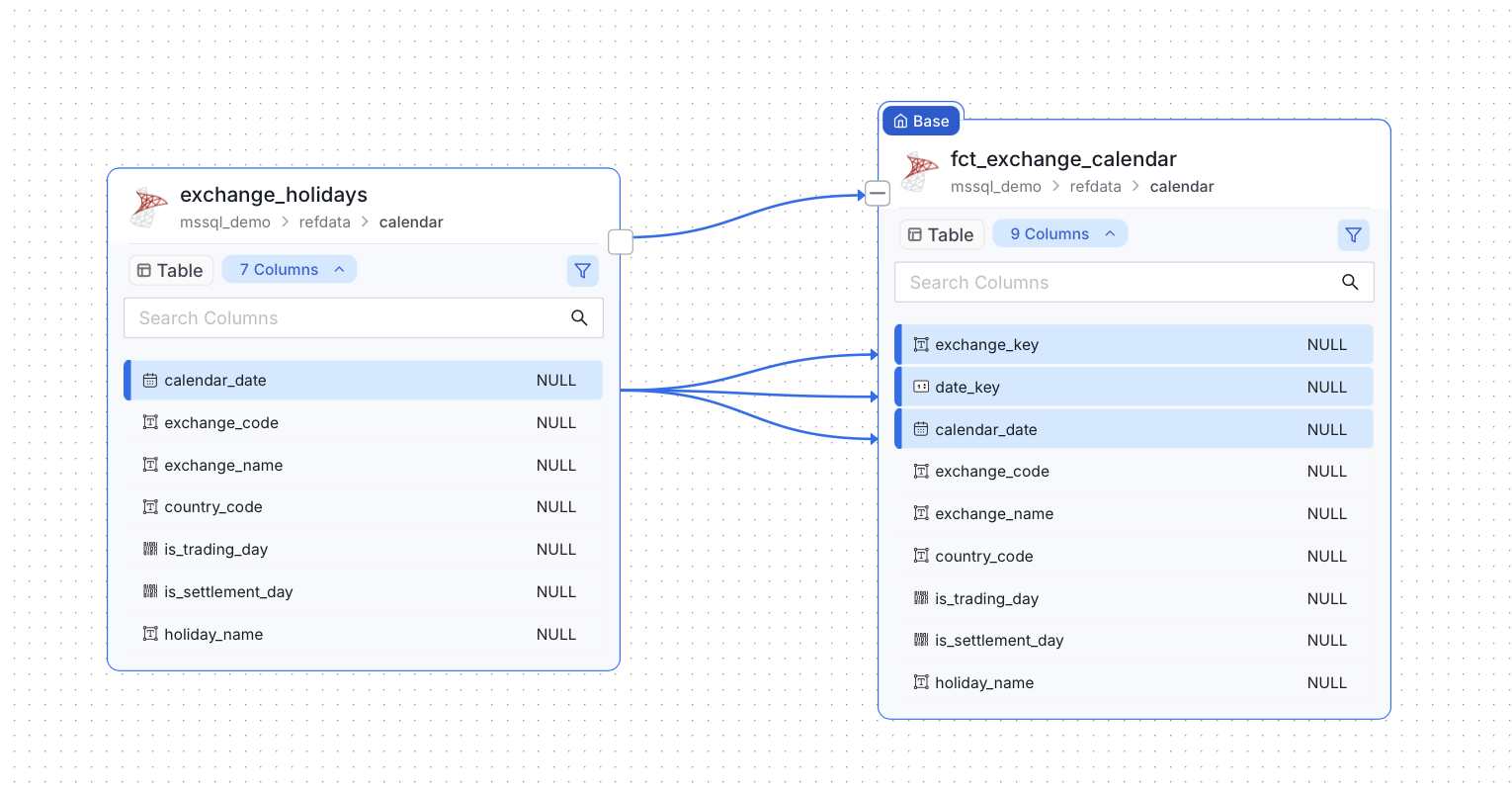
Above, from the dbt project in this repository: a seed table and the mart built from it, both in
SQL Server, with the column edges the emitter posted. Clicking one source column, calendar_date,
marks the three mart columns it feeds: the date key, the copy of itself, and exchange_key,
a surrogate key that dbt_utils.generate_surrogate_key hashes from calendar_date and
exchange_code. sqlglot worked that out from the compiled SQL; nothing was declared by hand.
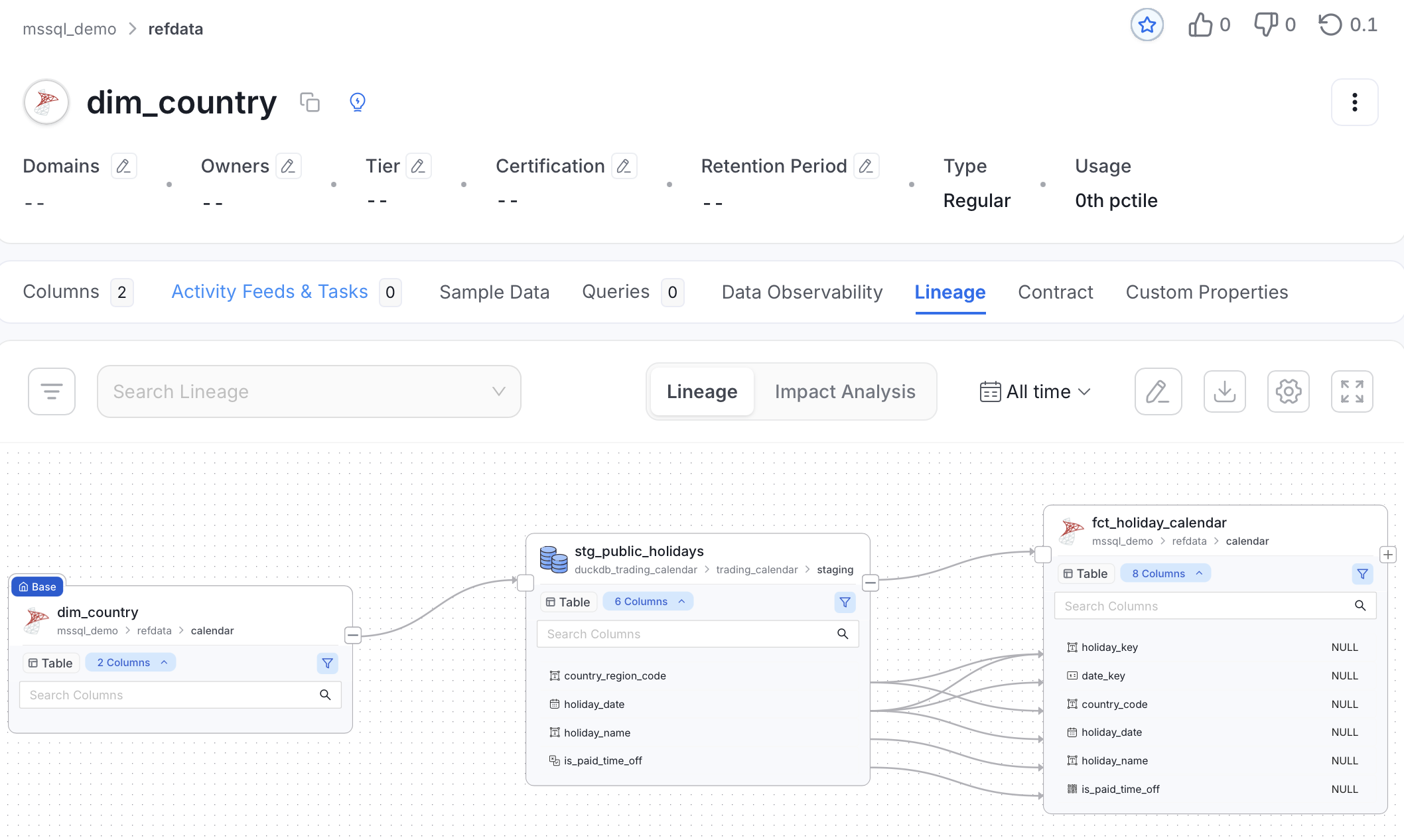
The same graph one table further out, and the reason for all of this. dim_country, a dbt seed
in SQL Server, feeds the staging table in the DuckDB catalog (duckdb_trading_calendar),
which feeds the mart back in SQL Server. The hop in the middle is the one the dbt agent cannot
resolve, and it is in the catalog only because the emitter created it.
The two left-hand edges carry no column lineage, and that is correct: the seed and the Parquet
source are used in a WHERE … IN filter and a file path, not selected into the staging table’s
columns. Column lineage starts where columns are actually projected, at the staging-to-mart hop.
You can check the same thing through the API:
curl -s -H "Authorization: Bearer $TOKEN" \
  "$OM_HOST/api/v1/lineage/table/name/target_service.dw.marts.dim_customer?upstreamDepth=3&downstreamDepth=1" \
  | jq '[.nodes[].type] | group_by(.) | map({(.[0]): length}) | add'
Re-running is safe for the graph, not for the column detail
Posting the same batch twice changes nothing, which is what you want from a loader that reruns. Measured on OpenMetadata 2.0.2, against one mart with three upstream edges and six column edges:
| posted | table edges | column edges |
|---|---|---|
the same batch again, same eventTime and runId |
3 | 6 |
the same graph with a new eventTime and runId |
3 | 6 |
the same graph with no columnLineage facet |
3 | 0 |
| the full batch again | 3 | 6 |
The timestamp has nothing to do with it. An edge is keyed on the two entities, so a second post overwrites the same edge instead of adding one, whatever the event says about when it ran.
The third row is the one to watch. OM replaces an edge’s lineageDetails with what the event
carries, and does not merge them, so a batch without column lineage deletes the column lineage
that was there while the table-level graph still looks healthy. That is exactly what a degraded
run produces: sqlglot missing, or OM credentials the schema lookup cannot use. We found it by
accident, with a mistyped token path, and watched six column edges become zero.
The emitter now refuses to post in that case. If sqlglot is installed and the models have compiled
SQL but not one event carries column lineage, it logs what is wrong and exits 1 rather than
overwriting the catalog with less than it already has. OL_ALLOW_EMPTY_COLUMN_LINEAGE=1 posts
anyway, for the run where that really is the intent.
Limits
The column lineage is only as good as sqlglot’s reading of the compiled SQL.
Jinja is already resolved in compiled_code, so macros are not a problem, but a
statement sqlglot cannot parse gives that model table-level lineage only. Every
column edge is sent as DIRECT; the script does not try to tell a straight copy
from an aggregation. Column lineage in OM is table-to-table. Edges to storage
containers (Parquet files in object storage) and API endpoints stay at table
level. And the bootstrap step exists only because autoCreateEntities is broken
in the versions we tested. If a later OM release fixes it, the script can run
with --no-bootstrap, and the SQL Server side of the bootstrap is already a
no-op when those tables are ingested.
What’s next: NATS instead of HTTP
Posting straight to OpenMetadata couples the loader to the catalog: if OM is down or slow, the run either waits or loses its lineage. A broker in between fixes that, and OpenLineage already supports one — its clients can emit to Kafka or Kinesis, and OpenMetadata’s OpenLineage connector consumes from exactly those two. We run NATS, not Kafka, so both ends of that path are missing.
Two pieces of work follow from it, and both are in the open:
- A NATS transport for the OpenLineage clients. Submitted:
issue #4971 and
PR #4972 add a
natstransport to the Python and Java clients, with JetStream and core NATS publishing, authentication and TLS, message deduplication and TTLs. Both are open at the time of writing. - A NATS source for OpenMetadata’s OpenLineage connector. Also submitted:
issue #33664 and draft
PR #33665 add NATS JetStream as a
third
brokerConfigoption beside Kafka and Kinesis, so the events this emitter produces are consumed by OM rather than pushed into it.
This repository already has the publishing half as a small script
(lineage/publish_openlineage_nats.py, scripts/nats.sh): the same events, put on a JetStream
subject instead of POSTed. It is a placeholder for the transport above, not a substitute for it.
There is a third thread. Hugr (MIT) is a data-mesh service that answers GraphQL queries across PostgreSQL, MySQL, SQL Server, files, Iceberg and REST APIs, using DuckDB as its engine — the same engine, and several of the same sources, as the pipeline described here. A federation layer that already knows which sources a query touched is in a good position to emit OpenLineage events for it. Whether that fits together with the DuckDB work in this repository is something we are looking into, not something that exists.
Authors
- Vladimir Gribanov — github.com/VGSML · linkedin.com/in/vladimirgribanov
- Örjan Lundberg — github.com/oluies · linkedin.com/in/orjanlundberg
Copyright © 2026 Örjan Lundberg. All rights reserved.